Standards-based grading with bubble sheets
Tag each question with the standard it measures, grade the class from one copier scan, and see every student's mastery of every standard: mastered, approaching or not yet. It's free for every teacher.
Tag questions with standards
- Common Core State Standards for Math and the Next Generation Science Standards are built in, from their publishers' own files.
- Add your own standards by pasting a list of codes and names, and district administrators can add a set for every teacher in the district.
- Type each question's codes, or tag a whole range of questions at once. RapidBubble suggests the set you used last.
- On the School & District plan, RapidBubble also suggests standards for each question you import, from the test's standards set and the grades you already tag. Nothing is tagged until you accept a suggestion. How the question checks work.
- Shuffled versions and duplicated tests keep the tags, so every version reports on the same standards.
Mastery for every student
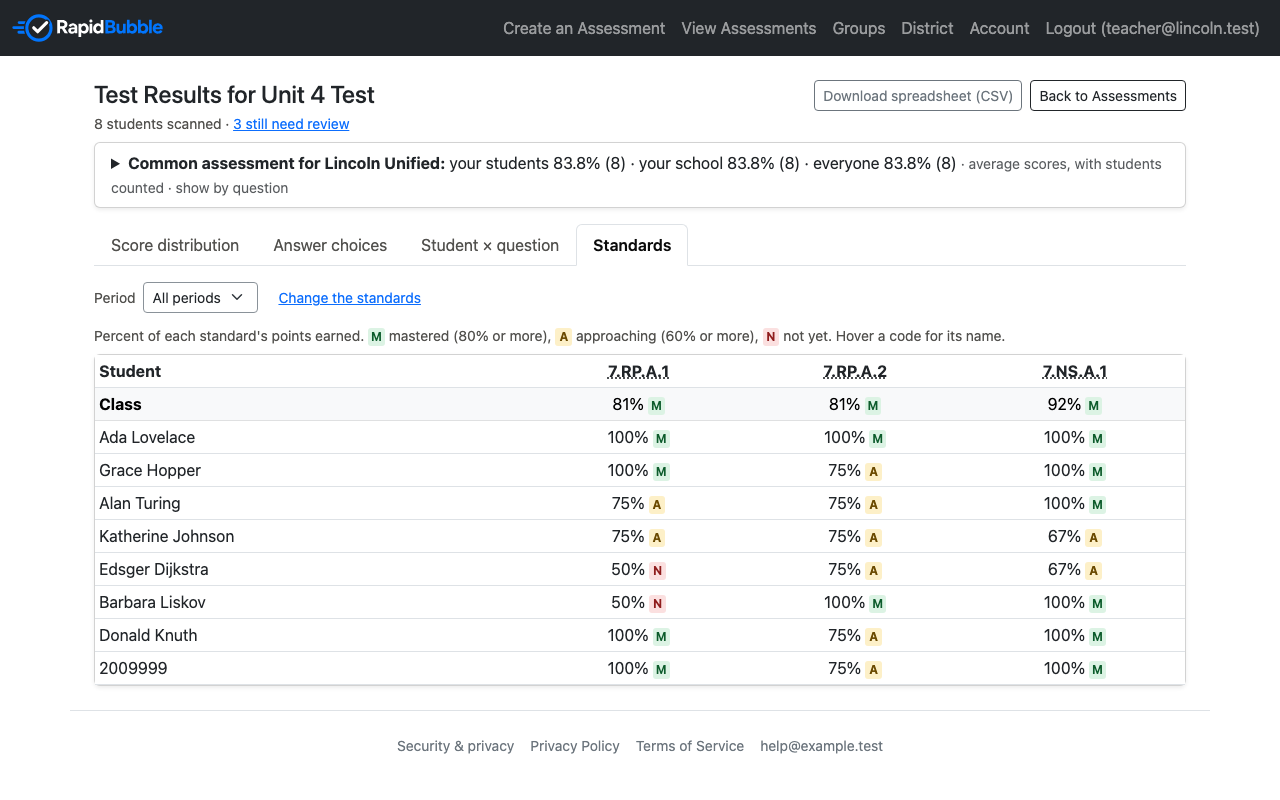
- A student's mastery of a standard is the share of its points they earned, so question points and partial credit count.
- Mastered at 80% or more, approaching at 60% or more, otherwise not yet, or the levels your district sets.
- The Standards tab of a test's results shows students × standards with a class row, filtered by class period. Each cell shows the percent and a level letter, not color alone.
- The results spreadsheet includes each student's percent for every tagged standard.
The 4-point standards-based grading scale
- Many districts report each standard on a 4-point scale. A common set of levels: 4 exceeds the standard, 3 meets it (proficient), 2 is partway there, and 1 is beginning, with 3, not 4, as the goal. One Oregon district's scale (opens in a new tab) is a typical example.
- The names and the evidence for each level vary from district to district; the Center for Assessment notes that there is no common definition of proficiency (opens in a new tab). Follow your own district's scale.
- RapidBubble doesn't give a 1 to 4 score. From each test it reports the percent of a standard's points a student earned and one of three levels: mastered, approaching or not yet, at 80% and 60% unless your district sets its own.
- To use those results on a 4-point scale, take the percent for each standard from the Standards tab or the results spreadsheet and apply your district's conversion. A 4 usually calls for more than one multiple-choice test can show.
Standards across a school or district
- Give a common assessment, and the report shows mastery of each standard school by school.
- Download every student's percent per standard as a spreadsheet for your data team.
- Part of the School & District plan. More about RapidBubble for districts.
Questions
Which standards can I tag?
Common Core State Standards for Math and the Next Generation Science Standards are built in. You can also paste in your own standards, and district administrators can add a set for the whole district.
How is mastery worked out?
A student's mastery of a standard is the percent of its points they earned on the questions tagged with it. 80% or more is mastered, 60% or more is approaching, and below that is not yet, unless your district sets its own levels.
Does standards mastery cost extra?
No. Tagging questions and the Standards view of your results are free for every teacher. District reports by standard come with the School & District plan.
Ready to try it with your next test?
Individual teacher accounts are free. Upload a test or enter a key, print the bubble sheets, and grade with any copier or a document camera.